

ZOD essentials
Zod is a TypeScript-first schema declaration and validation library. It provides a way to define the shape of data using a schema and then validate or transform data based on that schema. It is not a part of the TypeScript language itself but rather a third-party library designed to work well with TypeScript.
Zod

Zod offers a fluent API for defining data structures, including objects, arrays, unions, intersections, etc., and provides runtime validation for data conforming to those structures.
Installation
To integrate Zod into your project, use one of the following package managers:
# npm
npm i zod

# yarn
yarn add zod

# bun
bun add zod
Create the Schema
Let's consider a user schema as an example:
import { z } from "zod";

const UserSchema = z.object({
  username: z.string().min(3).max(14),
});

// Using the schema

const user1 = { username: "Arshil" }; // Valid object
const user2 = { username: "K" }; // Invalid object

console.log(UserSchema.parse(user1)); // Valid
console.log(UserSchema.parse(user2)); // Throws error
Output
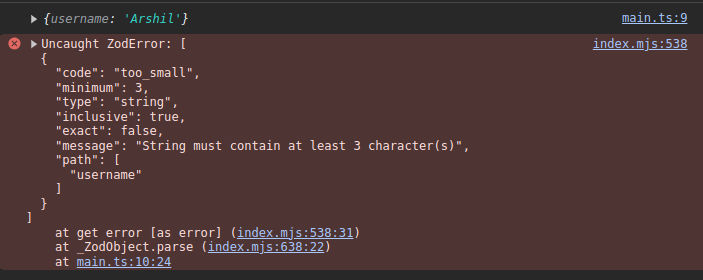
The parse() method is used to verify the schema. If the passed argument does not match the required schema, it throws an error. If it matches the schema, it returns the object.
To prevent errors in the code, the safeParse() method can be used.
Using safeParse() method
console.log(UserSchema.safeParse({ username: "K" }));
Output
{
  success: false;
}
Using TypeScript
const UserSchema = z.object({
  username: z.string().min(3).max(14),
});

type User = z.infer<typeof UserSchema>;

const user: User = { username: "Arshil" };
// user has type property - { username: string }
Supported Data Types
Primitive Data Types
| # | Data Type | Function |
|---|---|---|
| 1 | string | z.string() |
| 2 | number | z.number() |
| 3 | bigint | z.bigint() |
| 4 | boolean | z.boolean() |
| 5 | date | z.date() |
| 6 | symbol | z.symbol() |
Non-Primitive Data Types
| # | Data Type | Function | Example |
|---|---|---|---|
| 1 | array | z.array(type) | z.array(z.string()).max().min().nonempty()....length() |
| 2 | tuple | z.tuple([...types]) | z.tuple(z.tuple([z.number(), z.string(), z.boolean()])).rest(z.string()) |
| 3 | union | z.union([...types]) | z.union([z.string(), z.number()]) |
| 4 | record | z.record(key_type, value_type) or z.record(value_type) | z.record(z.string(), z.number()) Default type is string for key if not specified |
| 5 | map | z.map(key_type, value_type) | z.map(z.string(), z.number()) |
| 6 | set | z.set(type) | z.set(z.string()) |
| 7 | promise | z.promise(return_type) | z.promise(z.string()) |
Empty Types
| # | Data Type | Function |
|---|---|---|
| 1 | undefined | z.undefined() |
| 2 | null | z.null() |
| 3 | void | z.void() |
Special TypeScript Types
| # | Data Type | Function | Description |
|---|---|---|---|
| 1 | any | z.any() | Catches any type just like any in TypeScript |
| 2 | unknown | z.unknown() | Catches any type just like unknown in TypeScript |
| 3 | never | z.never() | Allows no value |
Special Type of Validation
.optional()- Makes a property optional..default(val)- Sets a default value (can be a function returning a valid type)..nullable()- Allows values to benull..nullish()- Allows values to benullorundefined..literal<T>(_tVal)- Requires a value to be the same as the one passed inliteral()..enum([...])- Specifies an enum type.
const UserSchema = z.object({
  username: z.string().nullable(),
  age: z.number().optional(),
  birthDate: z.date().default(new Date("2004-10-1")),
  isProgrammer: z.boolean().default(false),
  owner: z.literal<string>("Arshil"),
  post: z.enum(["developer", "designer", "devOps", "marketing manager"]),
});
Handling Errors
To handle errors in Zod, install the zod-validation-error package:
npm i zod-validation-error
Use it in your code:
import { fromZodError } from "zod-validation-error";

// ... rest of your code

const UserSchema = z.object({
  // ...schema
});

const result = UserSchema.safeParse(user);
if (!result.success) {
  fromZodError(result.error);
} else {
  console.log(result);
}
Custom Validation
Zod allows custom validation using the refine method:
const DomainSchema = z
  .string()
  .url()
  .refine((val) => val.endsWith(".com"));
Viewing the Shape of the Object
console.log(UserSchema.shape);
console.log(UserSchema.shape.username);
console.log(UserSchema.shape.age);
//....
Passthrough
The passThrough() function allows undefined keys to be passed:
const UserSchema = z.object({
  name: z.string(),
});

const user = {
  name: "Arshil",
  post: "Developer",
};
console.log(UserSchema.parse(user)); // Only prints { name: "Arshil" }

const UserSchema_ = z
  .object({
    name: z.string(),
  })
  .passThrough();

console.log(UserSchema_.parse(user)); // Prints both properties of the object
Additional Features
.partial()- Makes all properties in an object optional..pick({ property: true })- Picks specific properties from a schema..omit({ property: true })- Omits specific properties from a schema